I run a side project called Global Crisis Monitor — a real-time geopolitical intelligence dashboard that turns 100+ news feeds into structured, impact-scored events on a map. The first post covered the why. This one covers the how: every pipeline stage, every threshold, and every tradeoff I made along the way.
The system runs continuously on a Hetzner server orchestrated by Coolify, processes around 1,000 articles per day, and produces structured events that appear on the dashboard typically within 10–15 minutes of an article being published. At this volume, LLM cost for synthesis is on the order of a few dollars per day; embeddings are free (Ollama). If you’re building anything that turns many documents into deduplicated, structured insights — news aggregation, support-ticket triage, or research synthesis — the architecture in this post transfers directly.
TL;DR — A 7-stage pipeline: Fetch (RSS, incremental, watermarked) → Embed (Ollama, 768-dim) → Cluster (pgvector, 0.72 similarity, 20-min hold) → Synthesize (3-pass LLM: triage, extraction, assessment with calibration anchors) → Conflict Link (keyword + embedding, multi-match) → Enrich (GDELT, ReliefWeb, UCDP, Wikipedia) → Publish (Telegram, IndexNow, social). Key lesson: embed and cluster before you send anything to an LLM, or you get duplicates and drift.
The Pipeline at a Glance
The core runs as a 7-stage sequential pipeline. Each stage reads from and writes to a shared PostgreSQL database on the same server, so stages are independently re-runnable without triggering the full pipeline.
1. Fetch → 2. Embed → 3. Cluster → 4. Synthesize → 5. Conflict Link → 6. Enrich → 7. PublishThe ingester is a Hono microservice running on Bun. The dashboard is a Next.js app (App Router, React 19). Both share the same Postgres through Prisma.
Schedule and re-runs. Each stage runs on its own cron; they don’t wait for each other. Fetch runs every few minutes, Embed and Cluster more frequently so new articles move through quickly, Synthesize and Enrich when there’s work to do. Because each stage only processes records in the right status (e.g. Fetch only inserts new articles, Embed only picks fetched articles), you can re-run a stage without re-triggering the whole pipeline — useful after a deploy or to backfill. Concurrency is single-worker per stage: one Fetch run at a time, one Synthesize run at a time. FOR UPDATE SKIP LOCKED (see Data Model) ensures that if you ever run multiple workers, they won’t double-process the same rows.
Below is the full architecture, stage by stage.
Stage 1: Fetch — Incremental RSS Ingestion
The first stage pulls from 100+ RSS feeds: Reuters, BBC, Al Jazeera, The Guardian, UN agencies, Chatham House, ICIJ, ProPublica, and dozens more.
Each Feed record in the database stores watermarks: lastItemPubDate and lastItemUrl. On every run, we only fetch articles published after the watermark. Feeds are tiered:
| Tier | Type | Examples | Max articles per fetch |
|---|---|---|---|
| 1 | Wire/breaking | AP, Reuters, AFP | 15 |
| 2 | Standard | All others | 5 |
Each feed is assigned a weight between 0.75 and 0.96. Wire services and UN agencies sit near the top (0.95–0.96); opinion outlets and less-established sources land lower. These weights influence confidence scores downstream.
Deduplication starts here with two checks:
| Check | How it works |
|---|---|
| Exact URL match | Article.url has a unique constraint |
| Content hash | SHA-256 of the normalised title catches the same story syndicated across outlets |
Title normalisation (trim, lowercase, collapse whitespace) is applied before the hash and again before embedding so syndicated variants match. We don’t hammer feeds: tier limits (5 or 15 articles per fetch) and staggered cron keep us well under any reasonable rate limit; the main backpressure is “only fetch after watermark.”
Failed feeds increment a consecutiveErrors counter and are skipped after 5 consecutive failures, so one broken RSS feed can’t stall the pipeline.
Stage 2: Embed — Self-Hosted Vector Embeddings
Every new article gets a 768-dimensional vector embedding via Ollama running nomic-embed-text locally on the server. I switched from OpenAI’s text-embedding-3-small to a self-hosted model to eliminate per-request costs and latency to an external API.
What gets embedded. We embed a single concatenated string: normalised title + first 500 characters of the article body (or summary if present). That keeps the vector focused on the main claim and early context; full-body embedding would dilute signal and blow token limits. The same normalisation as for the content hash (trim, lowercase, collapse whitespace) is applied before sending to Ollama.
The embeddings are batched (100 texts per Ollama request) and stored directly on the Article record as a vector(768) column in Postgres, leveraging pgvector.
The key insight: embed before you send anything to an LLM. My first approach was to batch articles and send each batch directly to GPT-4 for synthesis. The result was duplicate events — the same incident in different batches became two separate events. Vector embeddings solve this by grouping similar articles first; the LLM then only sees pre-grouped clusters.
Stage 3: Cluster — HNSW-Accelerated Similarity Grouping
This is where the magic happens. Articles about the same real-world event sit close together in vector space, even when the wording differs completely:
“Kyiv power grid struck by overnight barrage” ↔ “Ukraine capital hit by drone and missile attack”
These two headlines produce embeddings with ~0.87 cosine similarity — well above the CLUSTER_THRESHOLD of 0.72.
The clustering algorithm:
| Step | Action |
|---|---|
| 1 | Take all articles with status embedded |
| 2 | For each article, search existing pending clusters using pgvector’s cosine distance (<=> operator) against the cluster centroid |
| 3 | If similarity ≥ 0.72 → assign to that cluster; update centroid: centroid += (new_embedding - centroid) / n (n = cluster size after adding the article) |
| 4 | If no match → create a new single-article cluster |
I use HNSW indexes on the vector columns for approximate nearest-neighbor search, which keeps cluster assignment sub-millisecond even as the article count grows.
One subtlety I learned the hard way: you need a hold time before synthesis. My initial approach synthesised clusters immediately, which meant an article arriving 5 minutes later — about the same event — would create a new cluster instead of joining the existing one. The fix was a 20-minute hold (CLUSTER_HOLD_MINUTES = 20): clusters sit in pending status for at least 20 minutes before they’re eligible for synthesis, giving time for related articles from different feeds to accumulate.
Stage 4: Synthesize — Multi-Pass LLM Processing
This is the most complex stage. Each mature cluster (one that has passed the 20-minute hold) goes through three LLM passes:
Pass 1: Triage (gpt-4o-mini)
A fast relevance filter. The LLM reads the cluster’s articles and decides: is this a geopolitical/conflict/humanitarian event, or is it sports, entertainment, or a product launch? Irrelevant clusters are discarded. Relevant ones get an initial title and summary.
Clusters are batched in groups of 10 for throughput. If an LLM call fails (timeout, rate limit, or API error), we retry with exponential backoff (up to 3 attempts); if it still fails, the cluster is marked failed and we move on so the pipeline doesn’t block. At ~1k articles/day we stay under OpenAI rate limits; batching and the tier-based model choice (gpt-4o only for 3+ article clusters) keep token usage in check.
Pass 2: Extraction (gpt-4o-mini)
Structured metadata extraction from the cluster:
| Field | Description |
|---|---|
| Categories | Controlled vocabulary (or new ones if needed) |
| Entities | Organisations, governments, armed groups, with their roles |
| People | Notable figures with titles |
| Locations | Primary (where the action happened) or secondary (mentioned but not central) |
| Temporal data | Event date, ongoing-since date, deadlines |
Pass 3: Assessment (gpt-4o or gpt-4o-mini)
Here’s where model selection gets interesting. Clusters with 3+ articles or tier-1 sources use gpt-4o for assessment; smaller clusters use gpt-4o-mini. The reasoning: multi-source events are higher signal and justify the cost of a stronger model.
The assessment produces:
| Output | Values / meaning |
|---|---|
| Sentiment direction | Escalating / De-escalating / Stable / Unknown |
| Sentiment intensity | 0–100 (severity of current state) |
| Impact scores (0–100 each) | Humanitarian, Economic, Security, Political, Overall |
| Analysis notes | 1–2 sentence analyst assessment |
Impact dimensions: Humanitarian (casualties, displacement), Economic (market disruption, sanctions), Security (military, terrorism), Political (government changes, diplomacy). Overall reflects the most significant dimension.
The prompt includes calibration anchors to keep impact scores consistent:
| Example event | Overall score |
|---|---|
| Russia–Ukraine invasion (2022) | 95 |
| UN sanctions resolution | 45 |
| Minor border skirmish | 15 |
| Massive earthquake with international response | 75 |
Without anchors, LLMs drift — they either score everything as high-impact or compress all scores into a narrow band. The anchors keep the scale meaningful.
Confidence Scoring
After synthesis, confidence is scaled by source count:
| Sources | Confidence multiplier |
|---|---|
| 3+ | 1.0× |
| 2 | 0.8× |
| 1 | 0.6× |
Single-source events are inherently less trustworthy, and the score reflects that.
Deduplication Across Runs
After synthesising a new event, we check it against all existing events via embedding similarity with a DEDUP_THRESHOLD of 0.82. Above that threshold, we merge — updating the existing event with new sources and refreshing metadata — instead of inserting a duplicate.
Stage 5: Conflict Link — Mapping Events to Ongoing Crises
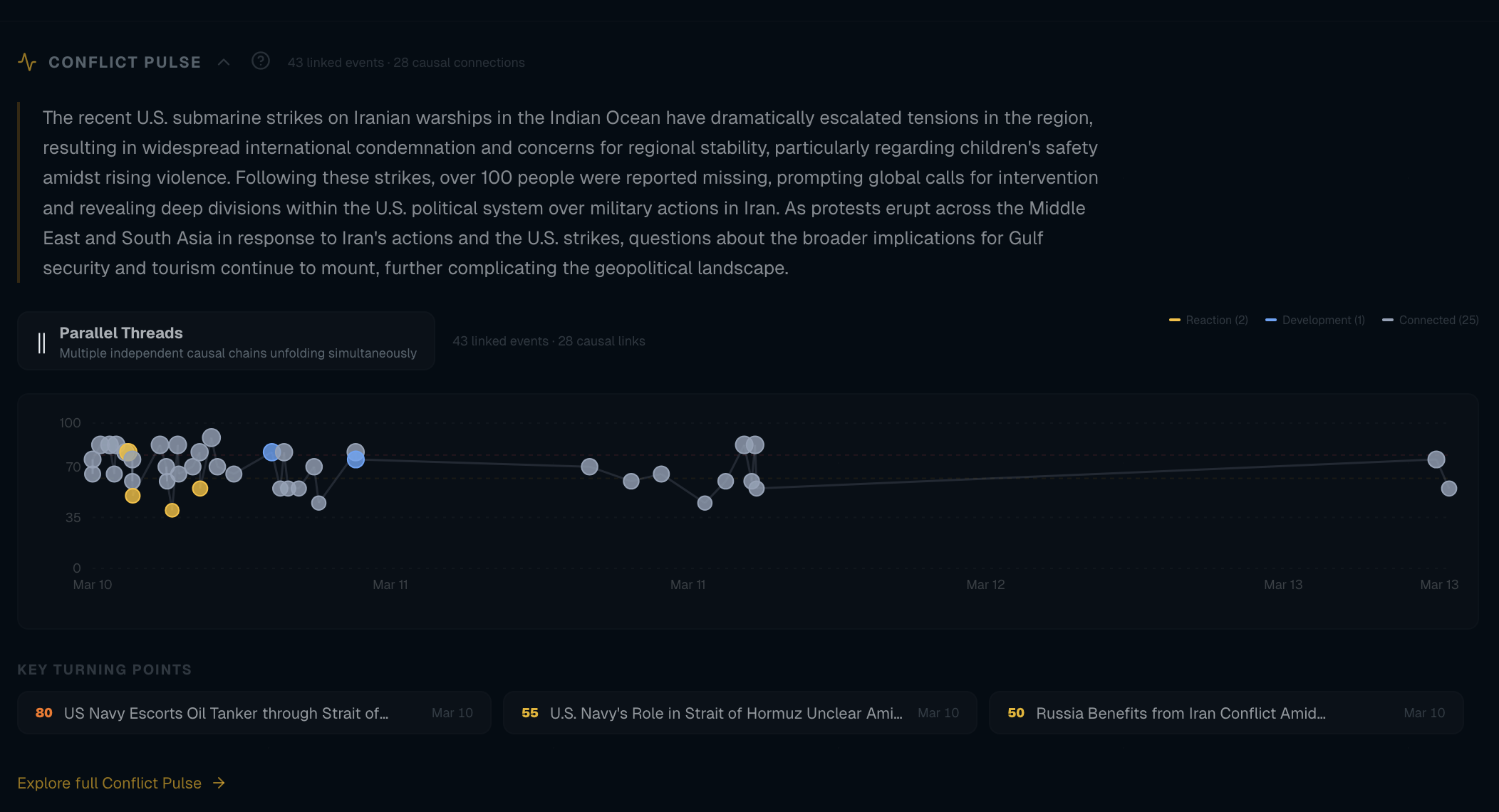
Events don’t exist in isolation. The conflict-link stage maps them to ongoing crises (“Russia-Ukraine War”, “Israel-Palestine Conflict”, “Iran Conflict Escalation”) and detects new conflicts emerging from patterns.
Linking to Existing Conflicts
Two-pass matching:
| Pass | Type | How it works |
|---|---|---|
| 1 | Keyword match (fast) | Conflict has locationKeywords and entityKeywords; event text containing any keyword is linked. Events can link to multiple conflicts — I learned this when “Iran Conflict Escalation” showed 0 events because the code had a break after the first match. |
| 2 | Embedding similarity (slow) | If no keyword match, compare event embedding to conflict embeddings; threshold 0.72. |
Detecting New Conflicts
When 3+ unlinked events cluster together by topic, the LLM proposes a new conflict: name, region, description, and keywords. These proposals are deduplication-checked (0.82 similarity) against existing conflicts to avoid creating “Sudan Civil War” twice.
Conflict Status Reassessment
Every 6 hours, conflicts are reassessed based on recent event patterns:
| Status | Meaning |
|---|---|
escalating | Intensity increasing |
active | Ongoing |
de-escalating | Intensity decreasing |
dormant | No events in 72 hours → trends toward this |
Stage 6: Enrich — External Data Integration
After synthesis and conflict linking, events are enriched from multiple external sources:
| Source | What it adds | Impact adjustment |
|---|---|---|
| GDELT 2.0 | Event volume and tone | High volume (>500 mentions): +5; strongly negative tone (<-3): +5 |
| ReliefWeb (UN OCHA) | Active disasters in the event’s region | One active disaster: +3; three or more: +5 more |
| UCDP (Uppsala Conflict Data Program) | Battle-related fatalities | Any fatalities: +5; >100: +5 more |
| Wikipedia | Entity enrichment | People, locations, organisations → WikiEntity table (extracts, thumbnails, Wikidata IDs) |
Impact adjustments from enrichment are clamped to ±15 points to prevent external data from overwhelming the LLM’s assessment. If an external API (GDELT, ReliefWeb, UCDP) is down or times out, we skip enrichment for that event and leave impact as the LLM-assessed value; no retry queue, so we don’t backlog. At current volume we’re well under any public API rate limits.
Event Relations
A separate sub-stage builds causal links between events using heuristics:
| Factor | Score | Cap |
|---|---|---|
| Same location | +0.4 | — |
| Each shared entity | +0.15 | 0.45 |
| Each shared person | +0.15 | 0.45 |
| Search window | — | 7 days |
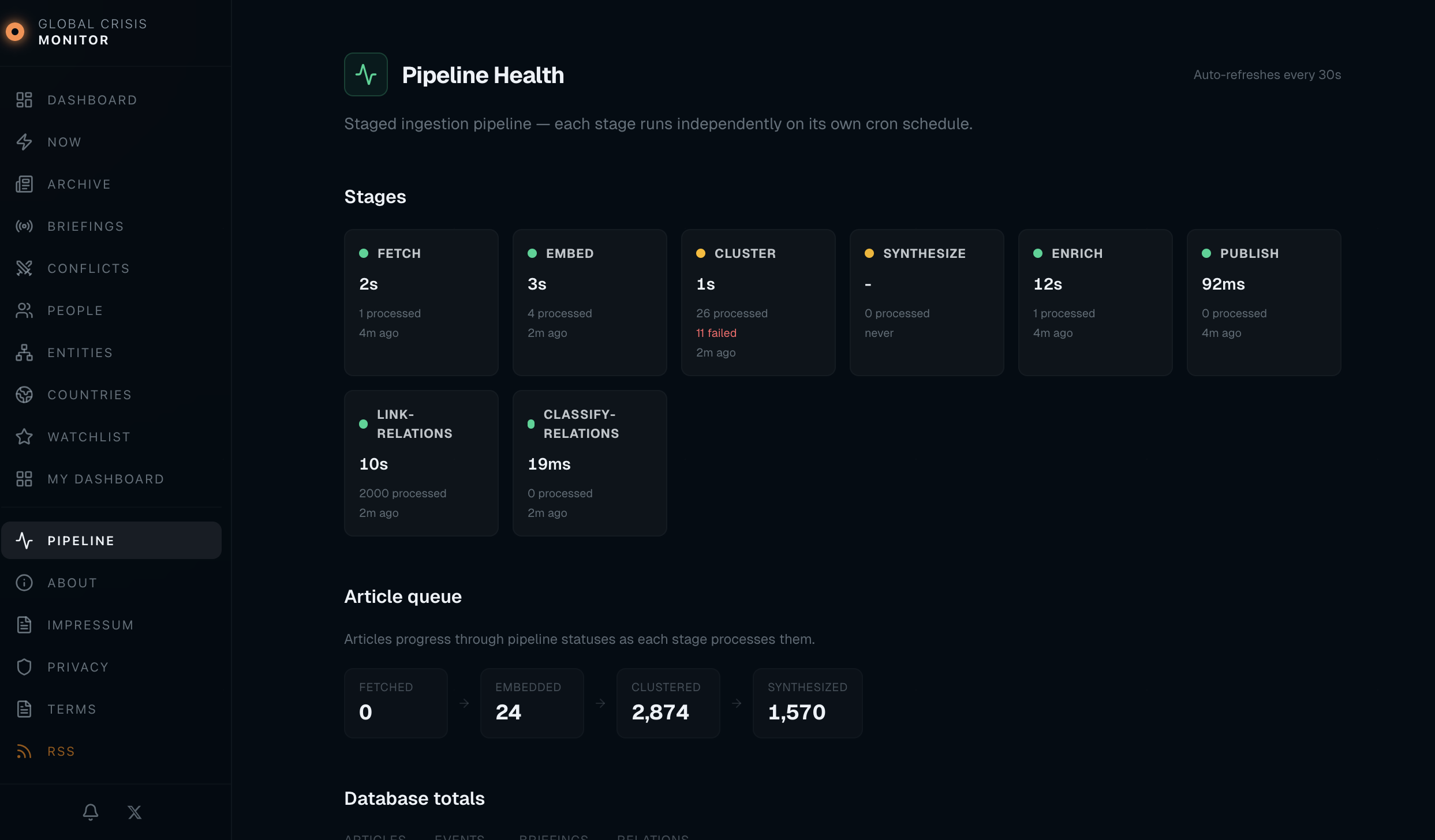
Relation types: escalation_of, continuation_of, related_to, response_to. The dashboard uses these to show “Related Events” on each event page; embedding-based relations (EventRelation) take priority over the heuristic fallback. In the admin Pipeline view, the Link-relations and Classify-relations steps are the sub-jobs that build and type these EventRelation rows (heuristic scoring first, then optional LLM pass to classify the relation type).
Stage 7: Publish — Alerts and Search Indexing
The final stage handles distribution:
Telegram Alerts
Events with impact ≥ 78 trigger a Telegram alert to a monitoring channel. The format is deliberate:
| Impact | Emoji |
|---|---|
| 90+ | 🚨 |
| 78+ | ⚡ |
Plus title, location, impact score, and a direct link.
IndexNow
All new events (not just high-impact) are submitted to the IndexNow protocol, which notifies Bing, Yandex, Naver, and Seznam about new URLs. It’s a single POST request with up to 10,000 URLs. Google doesn’t support IndexNow, but the others do — and fast indexing matters for news content.
Briefings
A separate job (every 20 minutes) builds a briefing from the last 24 hours of events: the LLM gets the event set and produces a short narrative summary plus key takeaways. The result is stored as a Briefing record and rendered at /briefings/[slug]; the same content is then used for social publishing.
Social Publishing
Briefings are auto-published to X/Twitter and Threads. The X publisher does character-count budgeting (280 chars minus t.co URL length minus hashtags) to maximise the summary excerpt that fits.
The Dashboard: Next.js with Shared Prisma
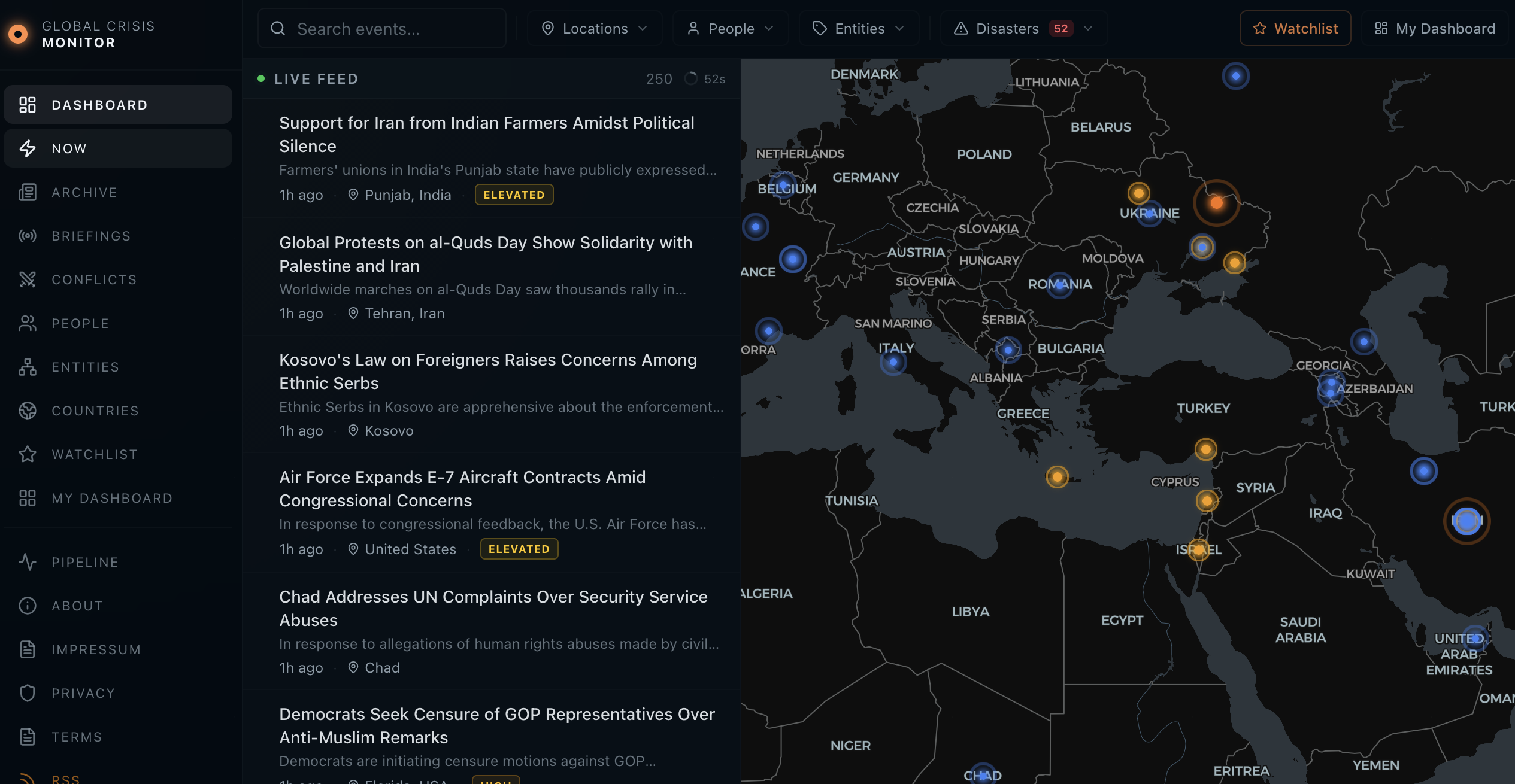
The dashboard is a Next.js 16 app (App Router) that reads from the same Postgres. Key surfaces:
| Route | Purpose |
|---|---|
| Home | Bento layout: Leaflet map (markers by impact, flash events pulsing), event feed, latest briefing |
/news | Searchable archive — TanStack Table + Query, server-side pagination/sort/filter by impact, location, people, entities, date range |
/news/[slug] | Event detail — JSON-LD NewsArticle, related events, linked conflicts, source attribution |
/briefings/[slug] | AI-generated briefings — JSON-LD AnalysisNewsArticle |
/conflicts/[slug] | Conflict pages — JSON-LD LiveBlogPosting, causal narratives, timeline of linked events |
| Admin | Internal: overview, pipeline health, entities, vocabulary (role-protected) |
Admin dashboard
Alongside the public site, the same Next.js app has an admin area for pipeline ops and content curation. It’s the same Prisma + Postgres, with role-based access so only I can reach it. Access is session-based (login); secrets (OpenAI key, Telegram bot token, DB URL) live in environment variables on the server, not in the repo. Four main views:
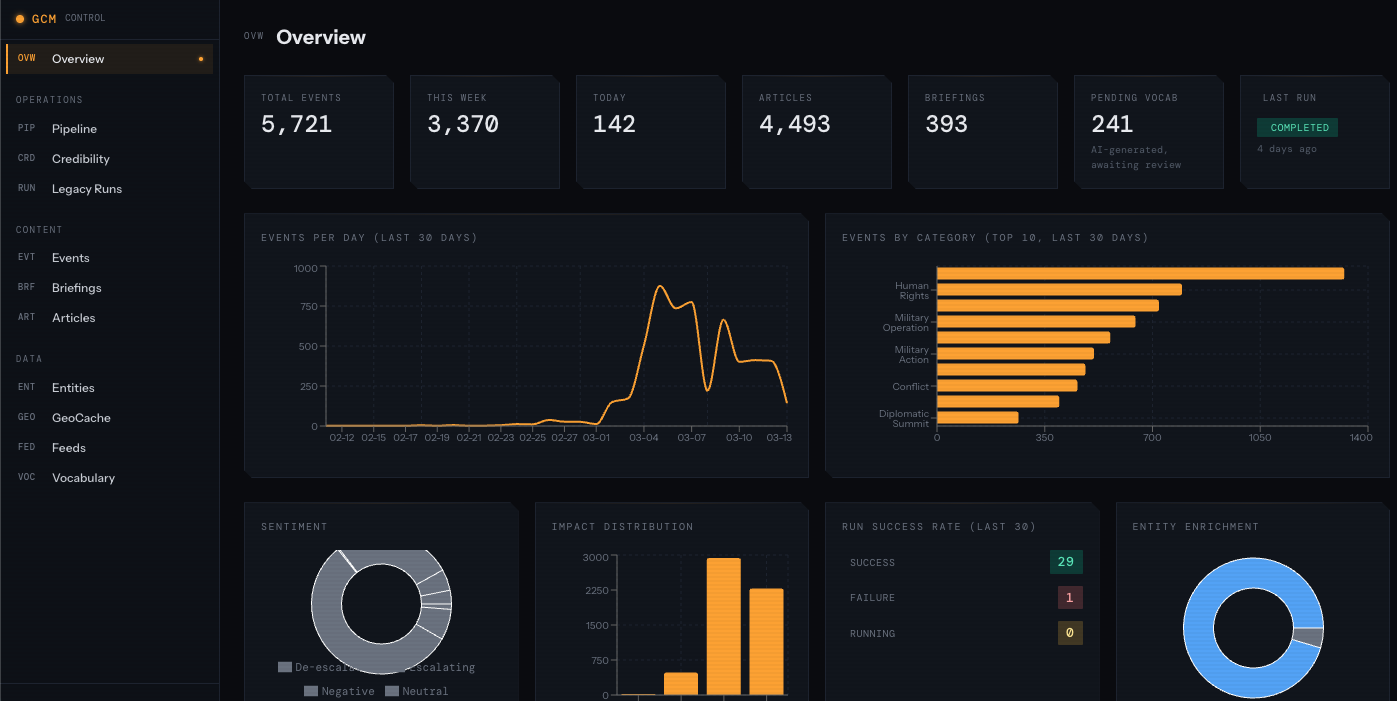
Overview — High-level counts (articles, events, clusters, conflicts), recent activity, and a quick sense of pipeline throughput.
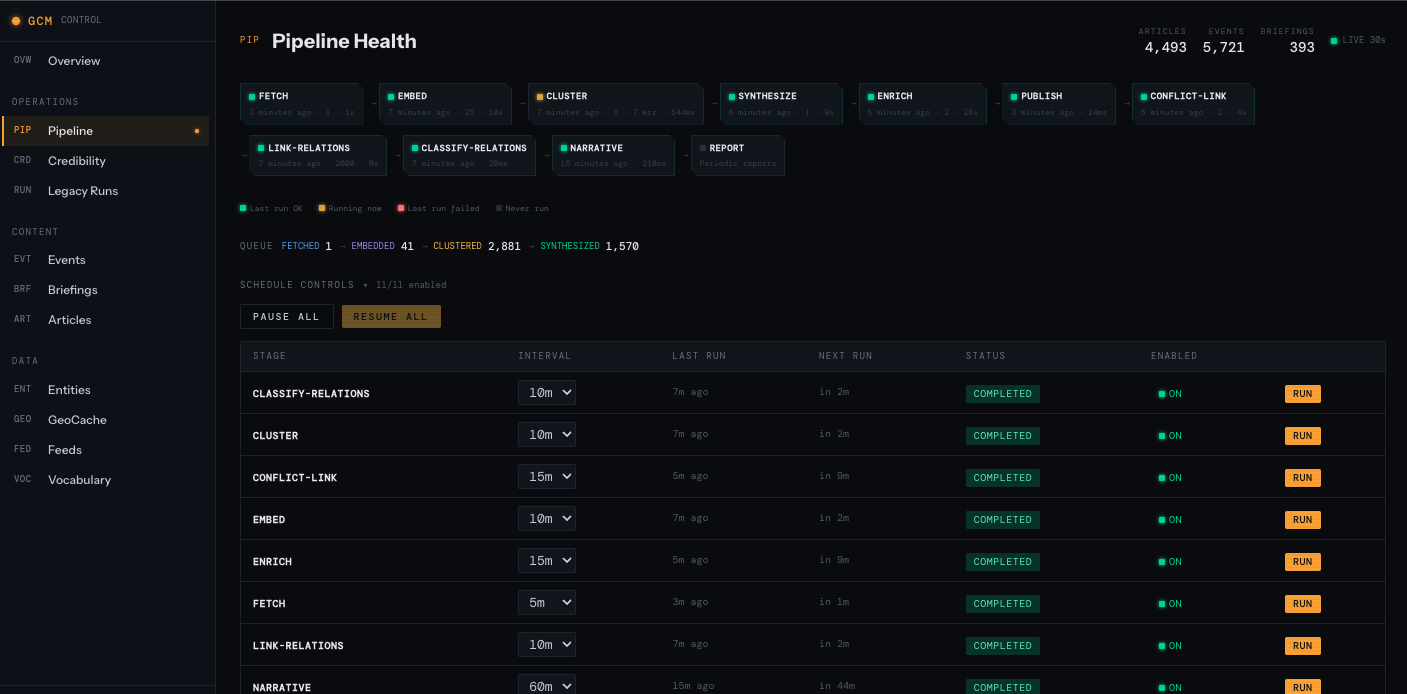
Pipeline — Per-stage status, last run times, processing duration, and article queue (fetched → embedded → clustered → synthesized). Auto-refreshes so I can see at a glance if a stage is stuck or failing.
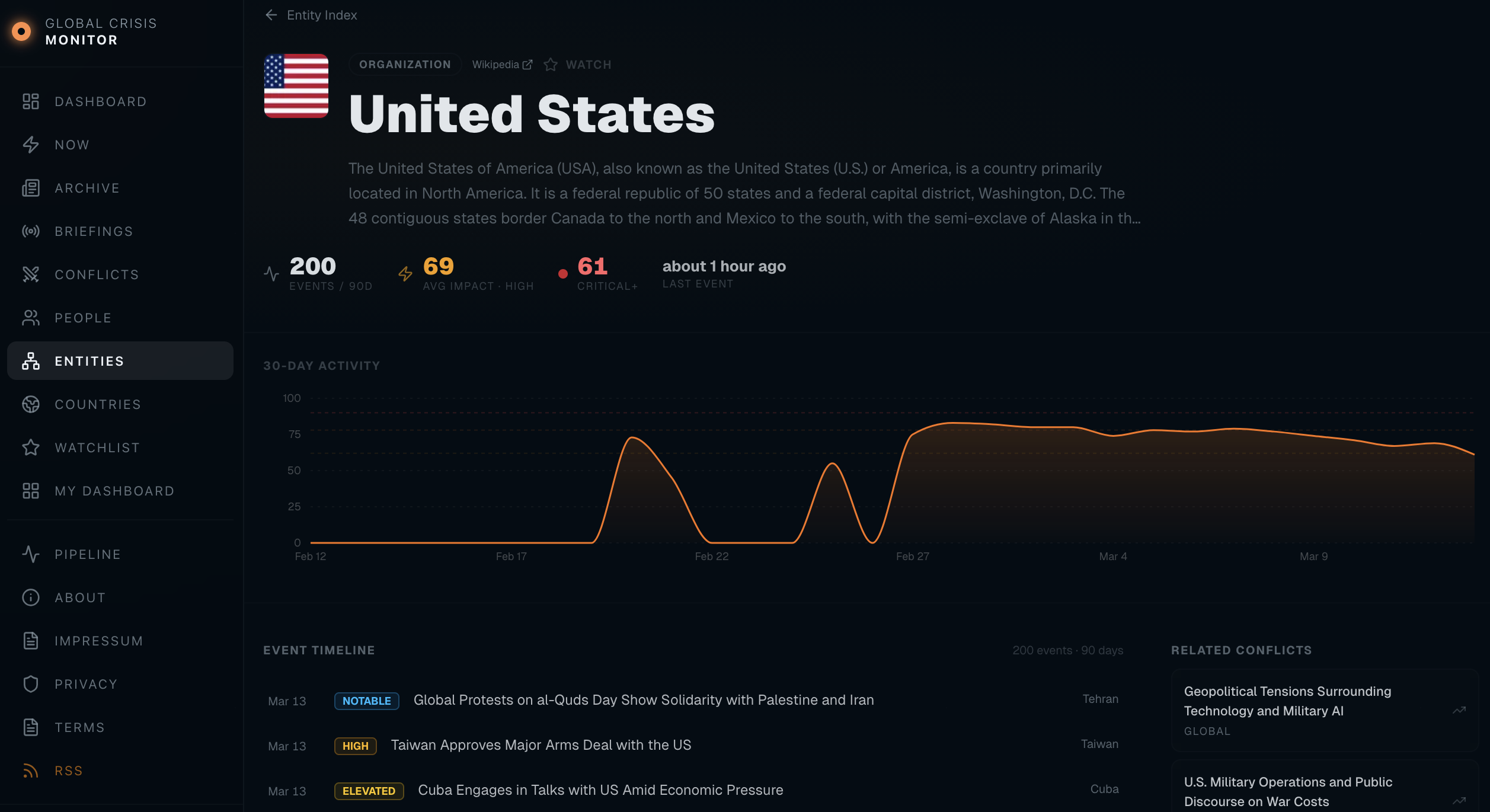
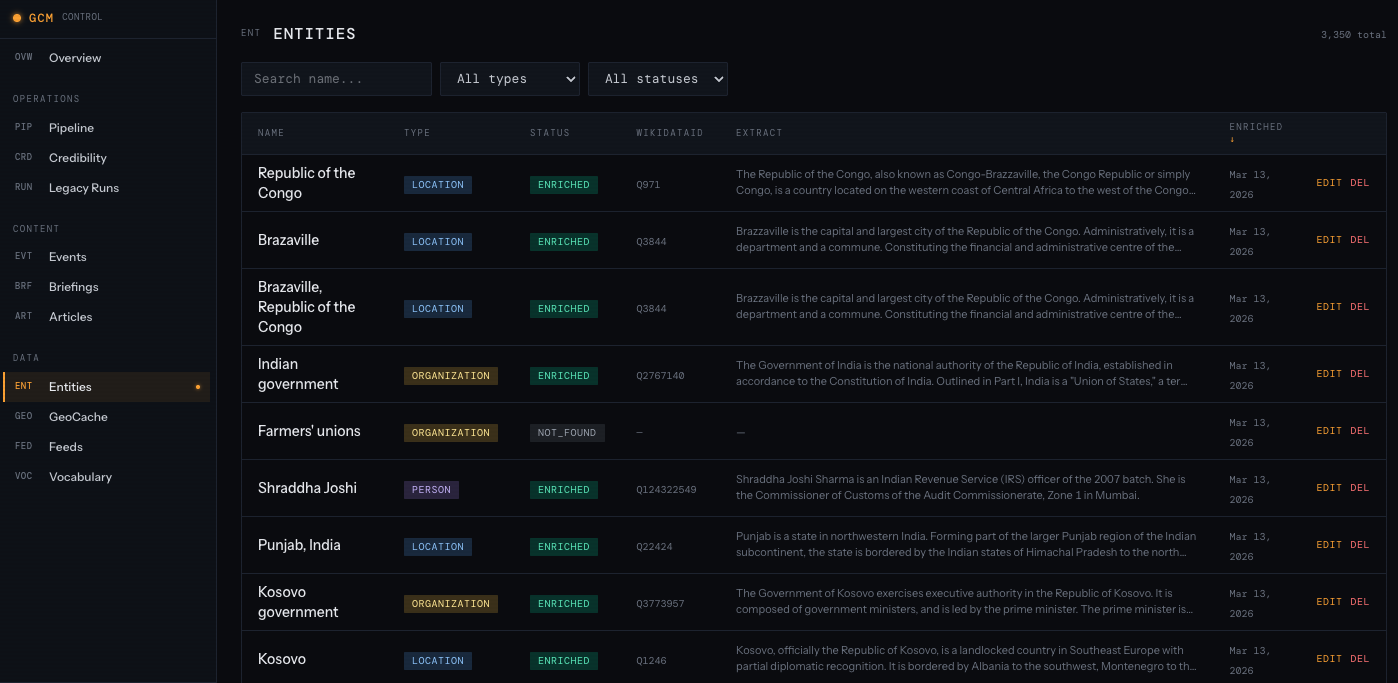
Entities — Browse and edit the entities (people, organisations, locations) that the pipeline and LLM produce. Useful for merging duplicates, fixing names, or adjusting how entities attach to events.
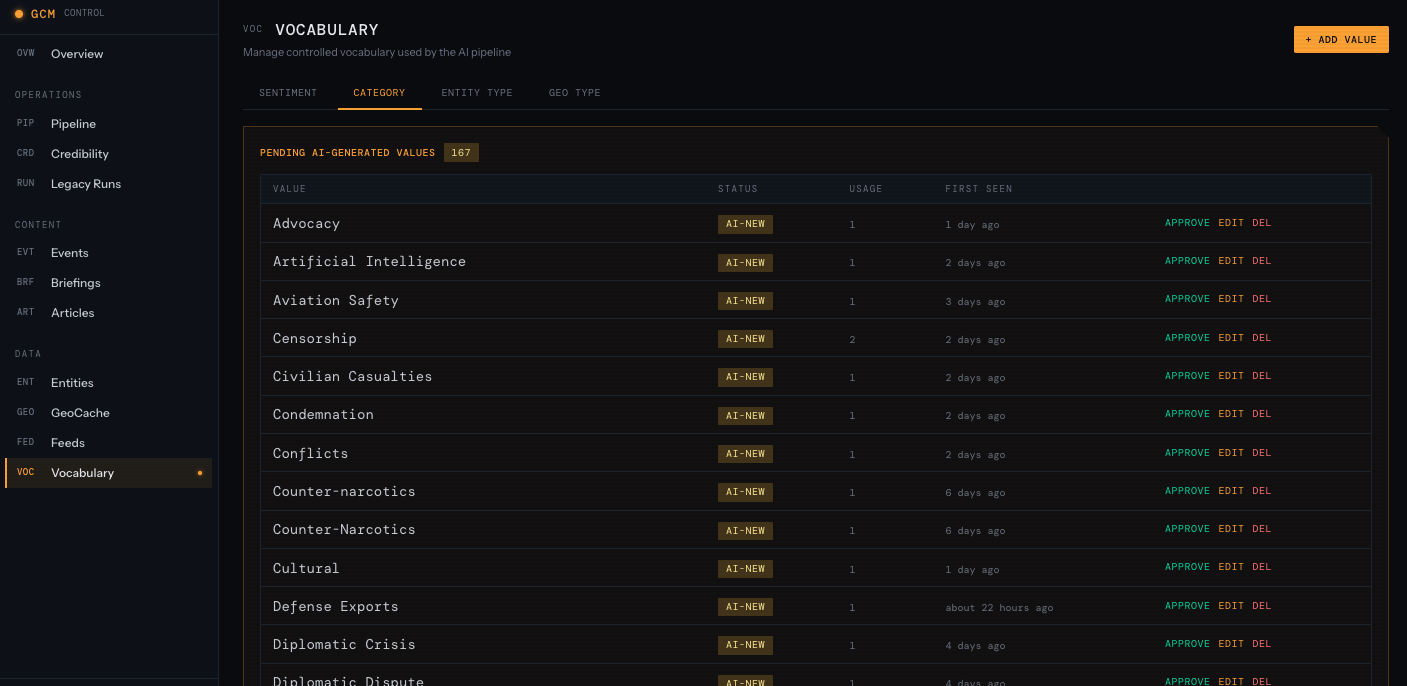
Vocabulary — Manage the controlled vocabularies used in synthesis: categories, conflict types, impact labels. When the LLM invents a new category, it shows up here; I can promote it to the official list or fold it into an existing term so future events stay consistent.
The admin doesn’t run the pipeline (that’s the Hono ingester on cron); it’s for visibility and for cleaning up the data the pipeline produces. For observability beyond the UI: the ingester logs structured JSON (stage, count, duration, errors) to stdout; Coolify captures logs. I don’t run a separate metrics stack, but the admin Pipeline view plus “no events in the last 2 hours” is enough to notice when something’s stuck. Alerts could be added (e.g. Telegram on repeated stage failure) if the pipeline were critical.
SEO
SEO for a news site is non-trivial; the current setup includes:
| Component | What it does |
|---|---|
| Dynamic sitemap | All events, briefings, conflicts, entities, countries — changeFrequency and priority |
| Google News sitemap | news-sitemap.xml with <news:news> tags for events in the last 48 hours |
| RSS feeds | /news/feed.xml, /briefings/feed.xml — auto-discovery via <link rel="alternate"> |
| Structured data | NewsArticle, AnalysisNewsArticle, LiveBlogPosting with full entity markup |
llms.txt | Machine-readable site description for LLM crawlers |
The Data Model
The Prisma schema has grown to ~20 models. The core ones:
Feed → Article → ArticleCluster → Event → Conflict
                                       → EventRelation
                                       → EventLocation
                                       → EnrichmentData
                                       → WikiEntity
Key design decisions:
| Decision | Rationale |
|---|---|
| M2M Events ↔ Conflicts | An event can belong to multiple conflicts |
| Vector columns everywhere | Articles, Events, Conflicts (all 768-dim) have embedding columns for similarity |
| Pipeline status on Article | fetched → embedded → clustered → synthesized → failed tracks progress |
FOR UPDATE SKIP LOCKED | Prevents concurrent runs from processing the same articles; safe for parallel invocation |
Backfill and schema changes. When we add a stage or change logic, we re-run from the right place: e.g. after an embedding model change, reset embedded articles to fetched and re-run Embed and downstream. Prisma migrations apply to the shared DB; we run them before deploying a new ingester or dashboard version so the schema is always compatible. There’s no separate backfill script — just “fix status and re-run the stage.”
Data retention. We keep all articles and events; no TTL or automatic pruning. For a side project at ~1k articles/day, storage is negligible. If we needed to reclaim space, we’d archive old articles (e.g. older than 1 year) to cold storage and keep events and clusters for the dashboard.
Numbers and Thresholds
Here’s the full reference table of thresholds I’ve tuned over time:
| Parameter | Value | What it controls |
|---|---|---|
CLUSTER_THRESHOLD | 0.72 | Min similarity to join a cluster |
DEDUP_THRESHOLD | 0.82 | Min similarity to merge with existing event |
CONFLICT_LINK_THRESHOLD | 0.72 | Min similarity to link event → conflict |
CONFLICT_DEDUP_THRESHOLD | 0.82 | Min similarity for new conflict proposals |
CLUSTER_HOLD_MINUTES | 20 | Wait time before synthesising a cluster |
MAX_CLUSTER_SIZE | 25 | Max articles per synthesis call |
STRONG_MODEL_THRESHOLD | 3 articles | Clusters ≥3 articles → gpt-4o |
ALERT_IMPACT_THRESHOLD | 78 | Min impact for Telegram alerts |
MIN_EVENTS_FOR_NEW_CONFLICT | 3 | Unlinked events needed to propose a conflict |
The 0.72 cluster threshold was lowered from 0.78 after switching from OpenAI embeddings to nomic-embed-text. Different embedding models produce different similarity distributions — what was 0.82 similarity in OpenAI space might be 0.75 in nomic space for the same article pair. Tuning these thresholds after an embedding model change is essential.
What I Learned
1. Embed first, LLM second. Sending raw articles to an LLM for grouping produces duplicates, inconsistent clusters, and high costs. Embedding-based clustering gives you deterministic, cheap grouping — the LLM only sees pre-grouped clusters.
2. Hold time matters. Real-world events don’t arrive at the same time across all feeds. Reuters might publish 10 minutes before The Guardian. Without a hold time, you synthesise too early and create duplicate events from late-arriving articles.
3. Calibration anchors prevent score drift. Without concrete examples in the prompt, impact scores drift across runs. One day everything is 80+, the next everything is 40. Anchoring to known events (Russia-Ukraine = 95, minor skirmish = 15) keeps the scale stable.
4. Multi-match, not first-match. Events often relate to multiple ongoing conflicts. A drone strike in the Red Sea might be relevant to both “Yemen-Houthi Conflict” and “Israel-Palestine Conflict”. Linking to only the first match loses context.
5. Enrichment should adjust, not override. External data (GDELT volume, UCDP fatalities) provides valuable calibration signals, but clamping adjustments to ±15 points prevents external noise from overriding the LLM’s assessment.
6. Self-hosted embeddings pay off fast. At ~1,000 articles/day, OpenAI embedding costs were small but nonzero and added latency. Ollama running nomic-embed-text on the same server produces embeddings in milliseconds with zero API cost. The quality difference for clustering purposes is negligible.
What I’d Do Differently Next Time
| Area | Current behaviour | Improvement |
|---|---|---|
| Cluster centroids | Updated as articles join | Recompute from all member embeddings periodically for stability |
| Triage | Some sports/entertainment clusters slip through | More negative examples in the triage prompt |
| Conflict embeddings | Computed once at creation | Refresh from recent linked events to improve link accuracy |
Stack Summary
Runtime
| Component | Tech |
|---|---|
| Ingester | Hono, Bun |
| Dashboard | Next.js 16, React 19 |
| Hosting | Hetzner, Coolify |
Data
| Component | Tech |
|---|---|
| Database | PostgreSQL, pgvector |
| ORM | Prisma 7 |
AI
| Component | Tech |
|---|---|
| Embeddings | Ollama (nomic-embed-text, 768-dim) |
| LLM | OpenAI (gpt-4o, gpt-4o-mini) |
Integrations
| Component | Tech |
|---|---|
| External data | GDELT, ReliefWeb, UCDP, Wikipedia |
| Alerting | Telegram, X, Threads |
| SEO | Dynamic sitemaps, Google News sitemap, IndexNow, JSON-LD |
The pattern — fetch → embed → cluster → synthesise → conflict link → enrich → publish — is general-purpose. If you’re building any system that turns many documents into structured, deduplicated insights — whether that’s news, support tickets, research papers, or internal reports — the architecture transfers directly.
The source of Global Crisis Monitor is private, but the dashboard is live at global-crisis-monitor.com. You can follow the automated feed at @glob_crisis_mtr on X, or subscribe via RSS. If you’re building something similar or adapting this pipeline for another domain, I’d be curious to hear how it goes.