· 9 min read
I Built an E-Ink Weather Frame for My Kids Who Can't Read Yet
I have three daughters. The oldest is four, the twins are two. None of them can read yet, and every morning we have some version of the same conversation: is it boots weather, why do I need the coat, where are we going today.
My phone is not an answer for a two-year-old. A wall calendar doesn’t know it’s going to rain at nine.
So I built one.
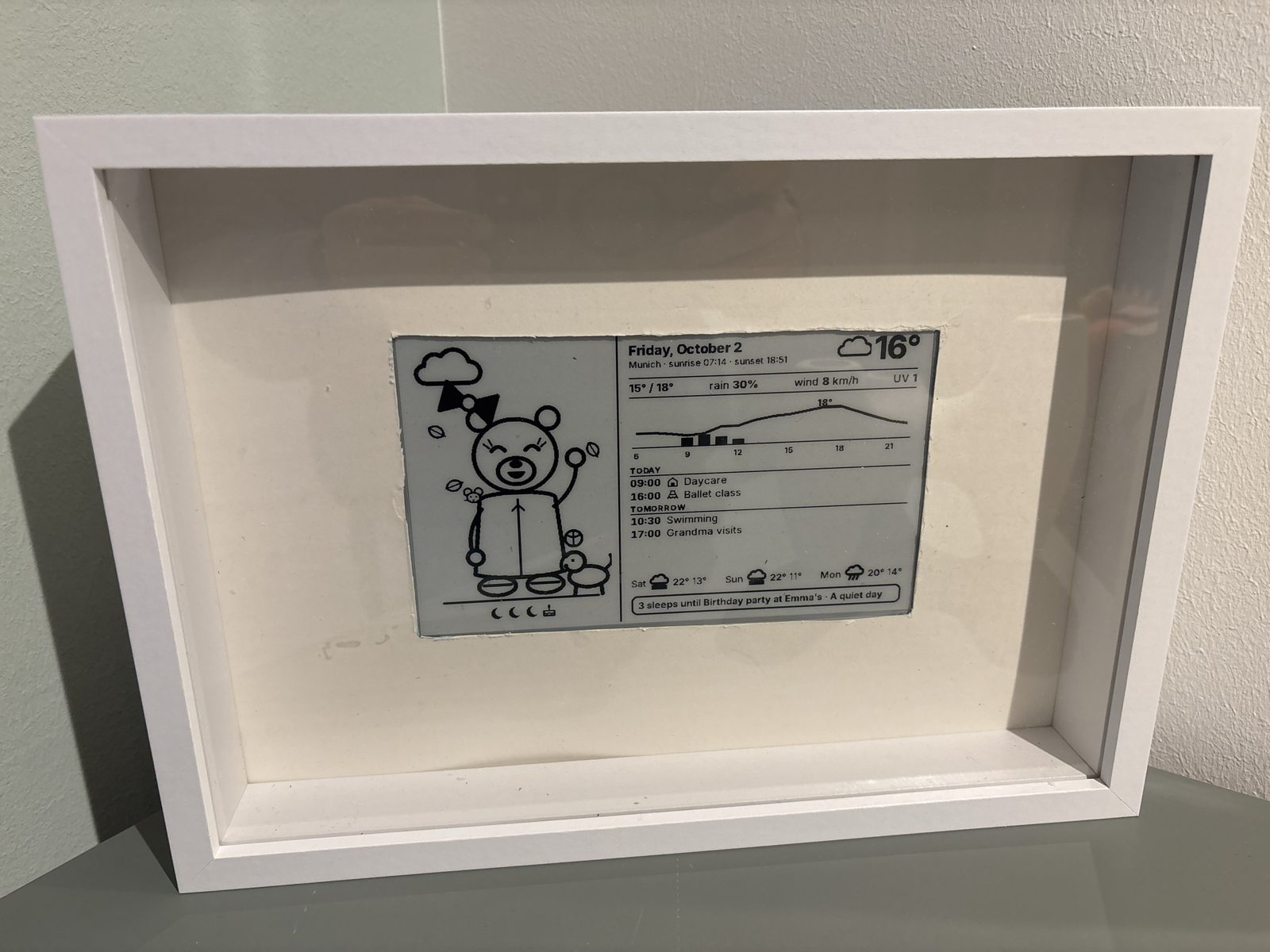
Note: the passe-partout in this photo isn’t cut properly yet. A professionally cut one is on its way.
The girls loved it straight away. They check it all the time.
What it does
The screen is split in two. The left side is for the kids: a little bear, drawn with thick lines like a colouring book, dressed for today’s weather and doing whatever we are doing at that time of day. The right side is for us grown-ups: temperature, an hourly chart, rain, the family calendar for today and tomorrow, and a one-line tip like “rain 9 to 12: umbrella and boots”.
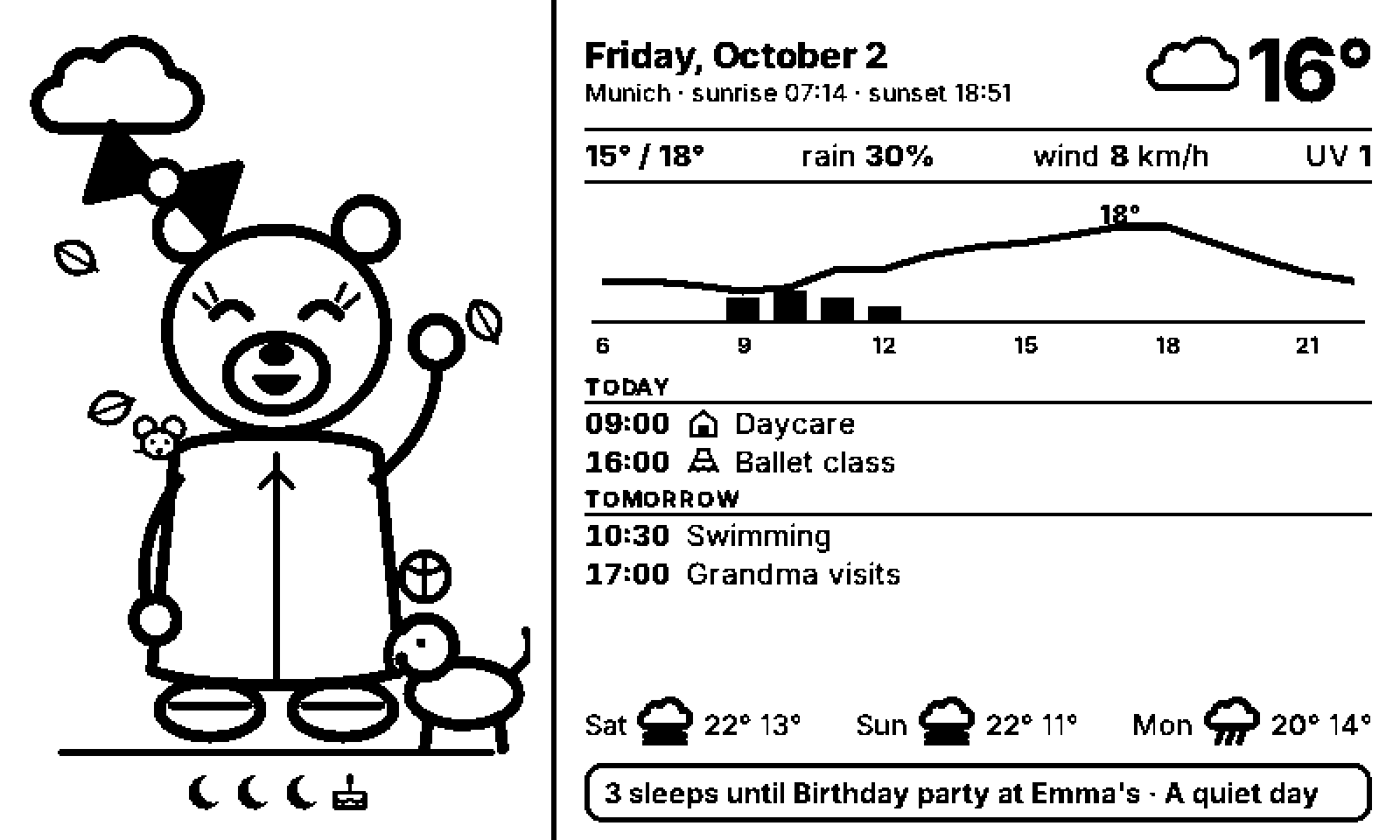
This is a demo screen with a made-up calendar, so it shows the features without our family’s actual week. The weather is real.
It refreshes every 15 minutes and only redraws when something changed. At night it just sits there showing the bear asleep.
The parts
Not much, honestly.
- Waveshare E-Paper ESP32 Driver Board (Rev 3, with USB-C). An ESP32 with Wi-Fi and a connector for the panel’s flat cable. The user manual (PDF) has the pinout.
- Waveshare 7.5 inch e-Paper, V2. 800×480, black and white. The manual is worth a read for the refresh timings.
- A deep white box frame with a passe-partout. The screen sits behind the glass, the passe-partout hides the panel’s border.
- A USB-C cable and any phone charger.
- A computer at home that’s always on. Mine already runs Home Assistant in Docker.
All in, it cost me about 130 euros.
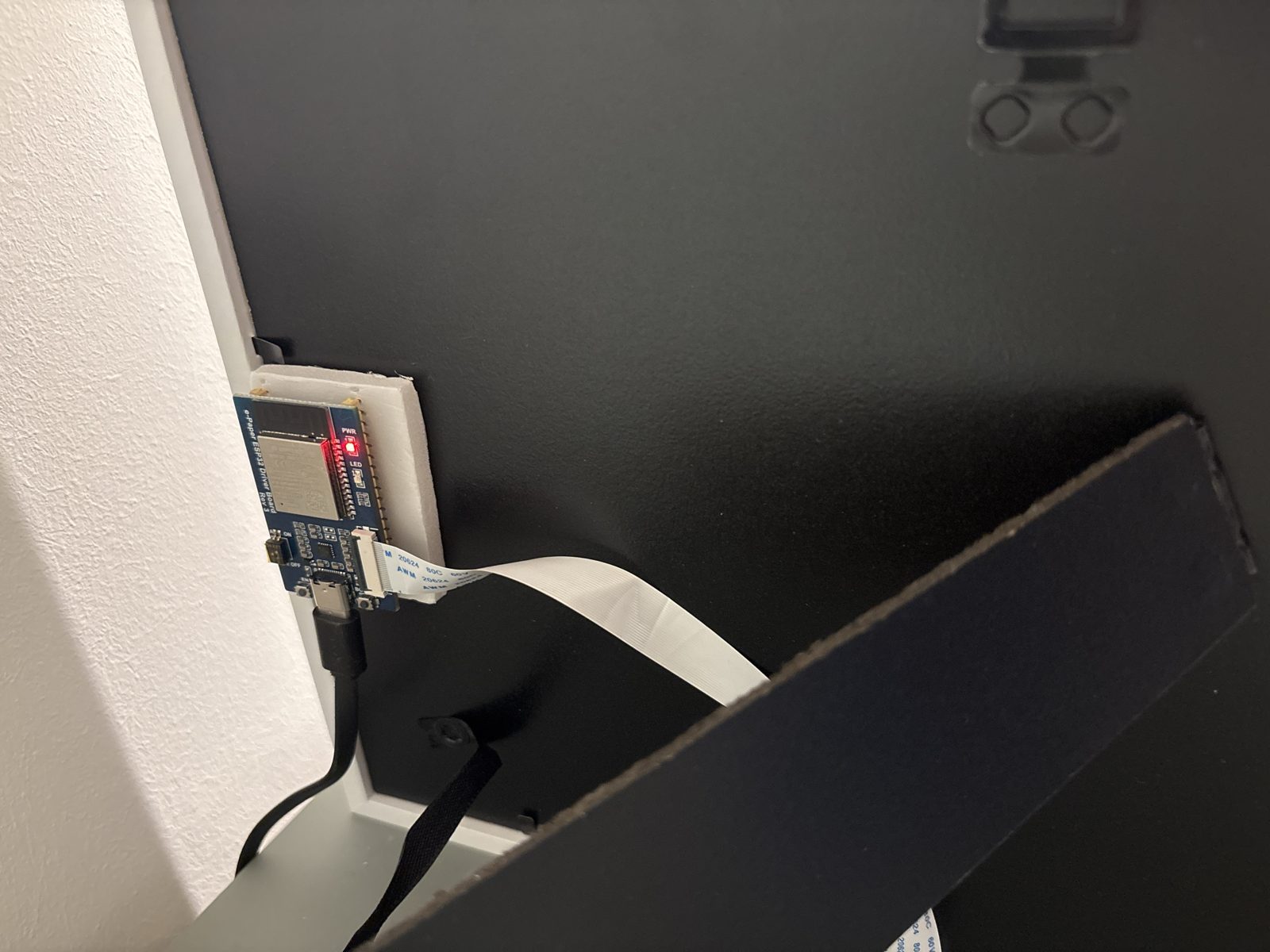
The board is stuck to a piece of foam on the back of the frame. The flat cable goes to the panel, the USB-C cable goes down the wall. That’s the whole installation.
How it works
The board is dumb on purpose. It downloads a picture and shows it, that’s it.
Everything else runs in a small Docker container on the home PC. Every 15 minutes it checks the time, the weather from Open-Meteo (free, no API key) and our family Google Calendar through its private iCal address. It works out what the bear should be doing, renders an HTML page with SVG drawings, takes a screenshot with Playwright and converts it to 1-bit black and white. That’s 48,000 bytes.
The board fetches that image a minute after each quarter hour. The server sends a hash of the image along with it, so if nothing changed the board skips the redraw. E-ink flashes when it refreshes, and nobody needs that at 3 in the morning.
I went with HTML because drawing on a microcontroller pixel by pixel got old fast. Now changing the layout is some CSS and a container rebuild, and the board never needs a new firmware for it.
The memory problem
This is the part that cost me an evening, and the reason I’m writing the post.
The usual way to do this with ESPHome is its online_image component plus the waveshare_epaper display driver. On this board it downloads the image and immediately runs out of memory. It wants 48 KB in one block for the image and the biggest free block is around 16 KB. I tried another framework, then splitting the image into 8 KB strips. Same error. I was ready to order a board with PSRAM.
Then I stopped and thought about it: this board is sold specifically to drive e-paper screens. It can’t be this bad at it. And it isn’t. The e-paper controller has its own memory for the full image, so the ESP32 never has to hold it. ESPHome keeps a full copy of the screen in RAM and then wants a second copy for the downloaded picture. On a chip without PSRAM, two 48 KB buffers just don’t fit.
So I wrote a small external component for ESPHome, about 150 lines of C++. It reads the image from the network 1 KB at a time and pushes each chunk straight to the panel’s controller. A refresh takes about three seconds and the memory problem is gone. If you have this board and you’re seeing Failed to allocate, this is why.
The bear
My first version had a nice temperature chart and nothing else. The girls didn’t care at all, which in hindsight is pretty obvious. The bear fixed that.
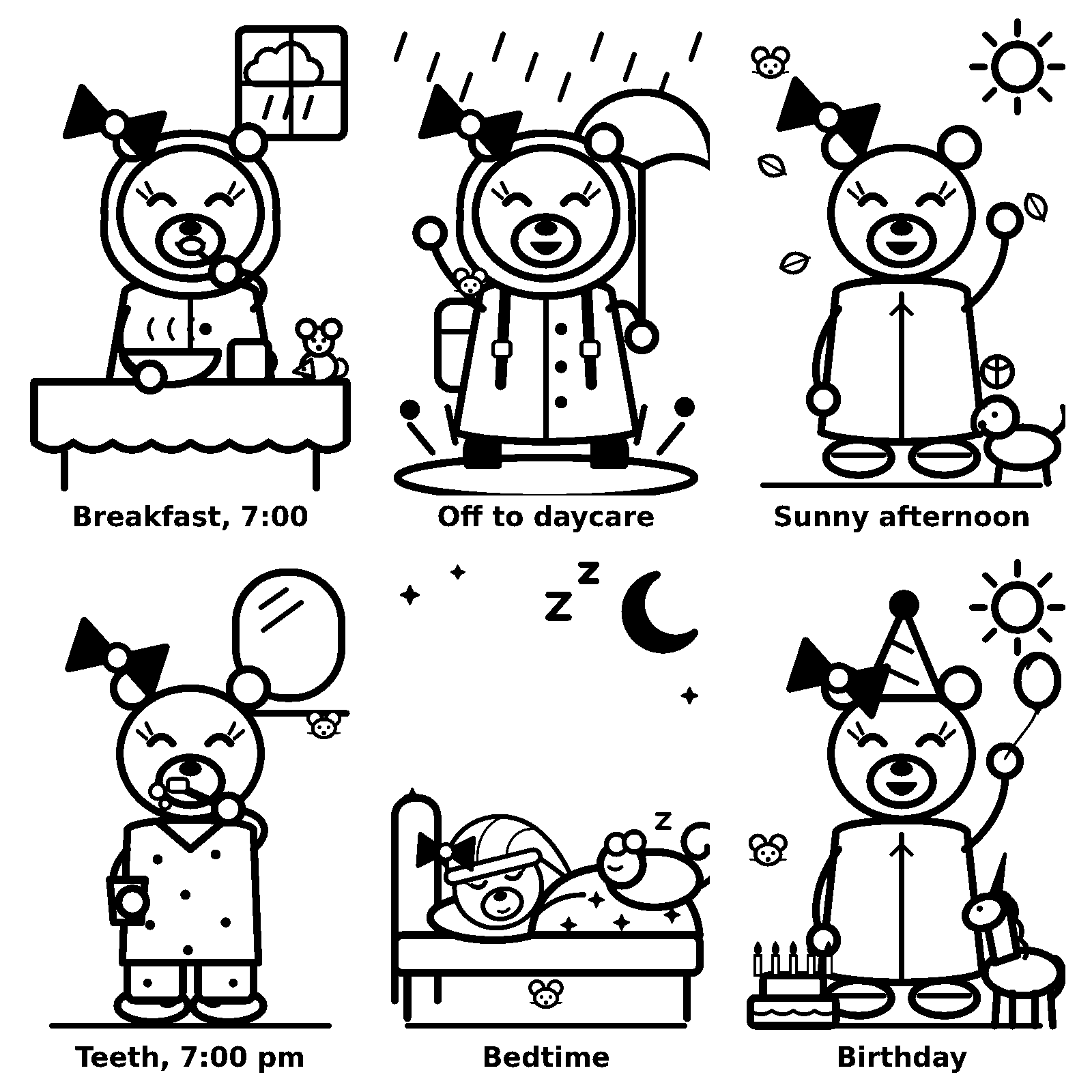
She dresses for the weather. Under 10 degrees it’s coat and beanie, rain means raincoat, boots and umbrella, snow adds gloves and a scarf.
She follows our actual day: breakfast at 7, backpack on from 8 on daycare days, lunch at 11:45, dinner at 6:45 with the moon outside the window, teeth at 7, bed at 7:15. The schedule is a small table in the code, one line per slot.
She has animal friends. A dormouse who sleeps with her, a mouse at breakfast, a puppy, a little elephant on hot days and a unicorn on birthdays. My daughters love a certain cartoon dormouse, but I wasn’t going to copy someone else’s character, so ours is just a dormouse.
The mouse also hides somewhere different every day. In her pocket, under the tablecloth, on the headboard.
This one worked better than I expected. The girls love hunting for it.
The calendar shows up as small things. Ballet days get tiny ballet shoes next to the event, party days get a party hat and a balloon. In the week before a birthday there’s a row of moons under the bear, one per night left. Kids this age understand “three sleeps” much better than “Saturday”.
Sometimes the girls draw something for the bear. I take a photo of it and send it to my home server, which puts the drawing in the frame for the day, in place of the chart, with their name underneath. For them, that means the bear got their present.
The fiddly part was crayons: pale yellow disappears completely when you convert to black and white, so the script counts saturated colour as ink even when it’s light.
If you want to build one
I’m not publishing the code, but none of it is hard. The order I’d do it in:
- Get the panel showing anything at all with ESPHome and its stock driver. Check the wiring, the refresh and the busy pin before writing any code of your own.
- Build the image on a computer, not on the board. Any language that can make a PNG works. HTML plus a headless browser is the easiest way I found to iterate on the design.
- Convert to 1-bit and serve it over HTTP on your home network.
- If your board has no PSRAM, stream the image to the panel instead of buffering it.
- Only then start on the fun part: characters, the calendar, all of it.
A few things I’d tell myself before starting:
- Split the screen by audience. The kids’ side has no text at all, the grown-ups’ side has no drawings.
- In the evening, switch to tomorrow’s forecast. That’s when you’re laying out the kids’ clothes for the next day, so today’s weather doesn’t matter anymore.
- Free APIs fail sometimes. One morning the weather service returned an error and the bear was still in her pyjamas after 7. Now the server retries and falls back to the last forecast.
- Keep it at home. The calendar and the kids’ drawings never leave our network.
Built with an AI assistant
I built this together with Claude. I decided what the frame should do, how the bear should look and what the girls would actually care about. Claude wrote most of the code, drew the bear’s SVG shapes and debugged with me when things broke.
It wasn’t magic. On the first evening a Docker change during the setup took down half my homelab, and when ESPHome ran out of memory its first answer was to buy a different board. I was the one who pushed back on that, and the custom component came out of that pushback. Working this way felt less like delegating and more like pairing with someone very fast who still needs you to say “no, think again”.
Projects I learned from
- Building an e-ink weather display for our home, Kimmo’s post about the same morning chaos with kids.
- hqn07/eink-dashboard, the same HTML to screenshot to 1-bit idea on a Waveshare 7.5” and an ESP32.
- lmarzen/esp32-weather-epd, probably the nicest looking e-ink weather display out there.
- TRMNL, a commercial device with the same 800×480 screen and an open ecosystem around it.