· 9 min read Updated
What it took to ship OpenTodo 1.0
OpenTodo 1.0 came out this week. If you used 0.24 a few days earlier, you won’t find anything new in it. There are no new features.
For a self-hosted app, I think 1.0 should mean something to the people who run it. Their scripts keep working, their phones keep syncing, their backups stay readable and upgrading stays boring. I didn’t want to just write that in the README and hope. So most of the work for 1.0 went into checks that fail the build when one of those things breaks.
This post goes through those checks, the bugs they caught, and the few things I decided not to check.
Compatibility
People depend on OpenTodo in four places: the HTTP API, the sync protocol between devices, the export format and the upgrade path from older versions. Each one has a test now.
For the API, there’s a snapshot of every v1 route with its parameters and response fields. A test compares the running server with it and only accepts additions. If I remove a field or rename a parameter, the build fails, and the only way around it is a new major version.
Sync works with an operation log. Every change is a small operation, such as “this field of this task got this value”, with a hybrid logical clock. Each field is declared once in Go, with its kind and its default. A generator writes the TypeScript types for the web app from that declaration, and a test fails if the generated files are out of date. Fields can be added but never renamed or removed.
I also test the clients against the server. I recorded the calls the web app, the CLI and the browser extension make, with tokens and passwords replaced. Every build replays them against the current server and checks the answers. This catches the case I worry about most: a phone that still runs an older cached version of the web app talking to a newer server.
The upgrade path took the most care. For every minor release since 0.1 there is a fixture: a real data directory, created by that release’s own binary through its own API. There are 25 of them. On every build, the current server opens each one, runs the migrations and checks that the data survived.
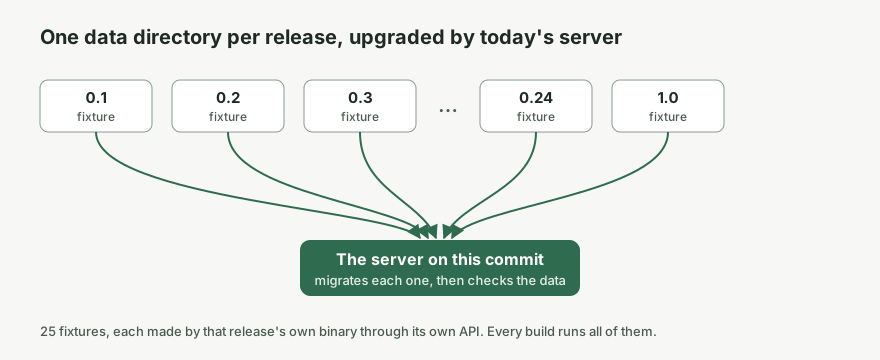
That’s why the release notes can say that any version since 0.1.0 upgrades directly to 1.0. Someone who skipped a year of updates doesn’t need to go through ten intermediate versions.
None of these tests is complicated. What they give me is that a break shows up as a red build, usually weeks before someone would have opened an issue.
Security
If you run a task manager for your family or a small team, you should be able to see how it protects your data, and where it doesn’t.
I started with documents instead of code: a threat model, a page that explains how each claim is checked, and a page of documented limits. The hardening came after, driven by those documents. I tried to keep to one rule: every claim in the threat model points to a test, or it’s listed as a limit.
Every route on the server is registered through a wrapper that requires a policy. Here are a few real lines from the router:
mux.handle("GET /healthz", public("health check for the container and load balancers"), s.handleHealth)
mux.handle("POST /api/v1/auth/login", public("password sign-in, rate limited per address"), s.handleLogin)
mux.handle("POST /api/v1/auth/logout", public("signing out must work with an expired session too"), s.handleLogout)
mux.handle("POST /api/v1/tokens", signedIn.Sensitive().DemoDenied(), s.handleCreateToken)
A public route has to say why it’s public, and a test fails if a route is registered any other way. On top of that there’s a route matrix. It calls every route as every kind of caller: anonymous, each token scope, a project member, a viewer, an expired session and another website. Then it compares each answer with what the policy promises.
For 1.0 I extended the matrix to the public routes, and it found a real bug in the logout route above. Because sign-out has to work with an expired session, the route is public, and so it skipped the cross-site check that signed-in routes get. A page on a sibling subdomain could sign you out. The fix was a few lines. I don’t think I would have found it by reading the code.
The audit log is now tamper-evident. Each event stores a hash of itself and of the event before it, so if someone edits, removes or reorders events in the database, verification points to the first broken link. The docs are clear about the limit: there’s no secret key, so someone who can write to the database can also rebuild the chain. It helps if you keep the chain head that each export ends with somewhere else. A later export then shows whether the history you saw is still there.
Before each release I also run an AI security review over everything that changed since the last tag. It’s a useful extra pass, but it isn’t an independent review and the docs don’t present it as one. OpenTodo hasn’t had an independent security review yet, and the threat model says so at the top.
Performance
The last promise is that the app stays fast with a lot of data. There are budgets for an account with 10,000 tasks: cold start, opening a project with 2,000 tasks, a search keystroke, completing a task, a first sync, memory and the server’s own numbers. A nightly job measures them in desktop Chromium, in a phone profile with the CPU slowed down four times, and on the server. If a value is over budget, the run fails.
Completing a task is measured like Core Web Vitals measure responsiveness: from the click to the frame that shows the tick, using the browser’s Event Timing API. The benchmark takes the slowest of ten completions and reports the median of five runs. The budget on the phone profile is 200 ms.
For a while that budget passed on some nights and failed on others. I put it down to noise on a shared CI runner and reran the job. That was a mistake.
When we profiled it, the slow completions weren’t random at all. The slow tap was waiting for work the previous tap had left behind. After every write, the app recomputed every list, group and count from all 10,000 tasks in one synchronous redraw, which took 150 to 250 ms on the phone profile. If you tapped again quickly, your second tap landed in the middle of it.
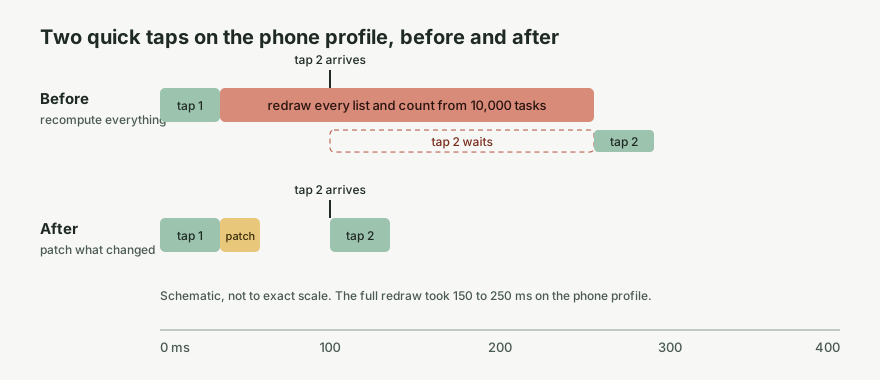
The fix was to update each derived value from the rows that a write actually changed. Every list, count and badge still has its full computation, plus a patch for the common cases, and it falls back to the full version for anything the patch can’t handle. A change like this is easy to get subtly wrong, so it came with an equivalence test. It builds a random account, applies 150 random writes per seed across eight seeds, and after every step compares each patched value with a full recomputation. Simplified, the loop looks like this:
for (let step = 0; step < steps; step++) {
  const next = apply(stored, randomWrites(r))
  const patched = patchSets(sets, next.changes, projects, state)
  const full = deriveSets(next.rows, projects, state)
  expect(patched.every.map((t) => t.id), `seed ${seed} step ${step}`)
    .toEqual(full.every.map((t) => t.id))
  // ...and the same for the index, open counts, progress, flows, Today, the sidebar and the badge
}
Completing a task on the phone profile went from 224 ms to 96 ms.
The same thing happened twice more before the release. Note search failed its phone budget because the first keystrokes after a first sync ran into leftover work: the sync’s activity log being written in one block, and a search index that was only built in idle moments that never came. Then the server’s push budget failed because SQLite’s automatic WAL checkpoint runs inside whichever commit happens to cross its threshold, so 3 out of 20 pushes in the benchmark were also copying the log back into the database. Checkpoints now run in a background job and no write waits for them.
In all three cases, a budget that failed only sometimes turned out to be a real cost that only showed up sometimes. Users would have run into it sometimes too. Rerunning the job got me a green build and left the problem where it was.
What I didn’t gate
A few checks I had planned for 1.0 aren’t part of the release gate, and I think that was the right decision.
The plan said that every release from 1.0 onwards needed measurements from reference devices: a mid-range Android phone from 2022, an iPhone 12 and a Raspberry Pi 4. I don’t own any of them. A gate I can’t run either blocks every release or gets skipped quietly, and neither makes the release safer. So the performance docs now say that 1.0 was measured in CI only, explain what the phone profile emulates and what it doesn’t, and real devices are an open issue.
Screen-reader testing got the same treatment. The accessibility statement claims partial WCAG 2.2 AA conformance. Keyboard-only use and 200% zoom are tested on every core screen, and an accessibility check runs in CI on every screen. NVDA, VoiceOver and TalkBack passes get recorded as people run them, and right now the statement says there are none yet.
I prefer documenting a limit honestly to having a gate that only looks like one.
A note on AI
Most of OpenTodo’s code, specs and docs are written by AI coding agents working for me. The contributing guide says so. People sometimes ask whether you can trust software built like that. My answer is that I’d look at what’s checked, whoever wrote it.
All the checks in this post work the same way for any code: snapshots that refuse incompatible changes, a matrix that tries every kind of caller, budgets that fail the build, and an equivalence test that compares every shortcut with the slow, obvious answer. They’re also what makes working with agents fast for me. When a change passes all of them, I’m fairly confident it’s fine, and when it doesn’t, I find out before anyone else does.
If you run OpenTodo, upgrading means replacing the image and restarting. The release notes and the full list of what 1.0 promises are on the OpenTodo 1.0 release page, and there’s a shorter announcement on the OpenTodo blog.